Lorem Ipsum Generator
Generate clean placeholder text for mockups, wireframes, and design projects — paragraphs, sentences, or words, instantly.
Generate Placeholder Text
Your generated text will appear here.
Configure the options above and click Generate.
Quick Presets
What is Lorem Ipsum?
<p> tags — ready to paste into any editor or CMS.
Common Use Cases
More Free QuickFix Tools
All tools are free, instant, and require no account.
Built by AZRS Corp · Lorem Ipsum text is public domain · Runs 100% in your browser · No data collected
See Free Lorem Ipsum Generator in action
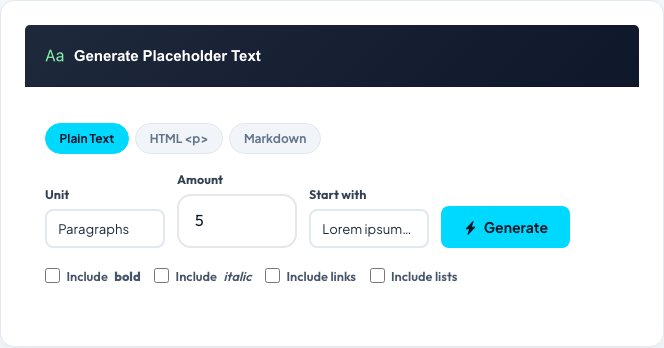
Free Lorem Ipsum Generator
Generate placeholder text for mockups, wireframes and design reviews in seconds. Choose your unit — paragraphs, sentences, words, or a target byte count — set the amount, and get instant filler text that runs 100% in your browser with no server round-trip.
Output can be plain text, HTML (each paragraph wrapped in <p> tags, ready to paste into a CMS or editor), or Markdown (blank-line-separated paragraphs with bold, italic and link examples), so it drops straight into whatever tool you're mocking up.
Key features
Four output units
Generate by paragraphs, sentences, words, or an approximate byte/character count.
Three formats
Plain text, HTML with <p> tags, or Markdown paragraphs — pick what your target platform needs.
Runs 100% client-side
No network requests after the page loads — instant generation, even offline.
Classic or random opening
Start with the traditional "Lorem ipsum dolor sit amet…" or generate fully randomized passages.
How to use it
- Choose a unit: paragraphs, sentences, words, or bytes.
- Set the amount you need for your mockup or wireframe.
- Pick a format: plain text, HTML, or Markdown.
- Generate, then copy or download the placeholder text.
Worked example
Example
Request: 2 paragraphs, HTML format
Output: <p>Lorem ipsum dolor sit amet, consectetur adipiscing elit, sed do eiusmod tempor incididunt ut labore et dolore magna aliqua.</p>
<p>Ut enim ad minim veniam, quis nostrud exercitation ullamco laboris nisi ut aliquip ex ea commodo consequat.</p>
Who uses this tool
UI/UX designers
Fill mockups and wireframes with realistic-length text before real copy is written.
Developers
Populate templates, component libraries, and CMS layouts during development and testing.
Content teams
Draft email or newsletter layouts before the final copy is ready.
Tips for the best results
- Use the Bytes unit when a design or API has a strict character-length limit you need to test against.
- HTML mode is ready to paste directly into a CMS body field without extra formatting work.
- Word count mode is handy for content areas with strict character limits, like meta descriptions or card titles.
- Keep the classic "Lorem ipsum…" opening when you want reviewers to instantly recognize it as placeholder text, not real content.
Common mistakes to avoid
- Leaving Lorem Ipsum in a shipped product — it's a design-stage tool only.
- Generating a random amount and assuming it matches your target length exactly — word/byte counts are approximate around sentence and paragraph boundaries.
- Using plain text output where a CMS expects HTML paragraph tags, leading to one unbroken text block on the live page.
Why use AZRS QuickFix?
It is 100% free, needs no signup and has no watermark or usage limits. The tool runs in your browser, so what you type stays on your device, and it works on phones, tablets and desktops. New tools are added every week — bookmark this page or browse the full QuickFix toolbox.
Frequently asked questions
What is Lorem Ipsum?
Standard placeholder text used in design and publishing, derived from a 45 BC Latin text by Cicero, scrambled so it reads plausibly without being distracting.
What's the difference between Paragraphs, Sentences and Words?
Paragraphs generates full blocks of several sentences; Sentences gives individual lines; Words returns an exact word count.
What does HTML mode do?
Wraps each paragraph in <p></p> tags so it's ready to paste into HTML editors or CMS platforms.
Can I use this text commercially?
Yes, Lorem Ipsum is public domain — free to use in commercial projects, mockups or shipped software without attribution.
Does this generator work offline?
Yes, once the page has loaded it runs 100% in your browser with no network requests.
Is there a limit to how much I can generate?
No account or limit — generate as much placeholder text as you need.