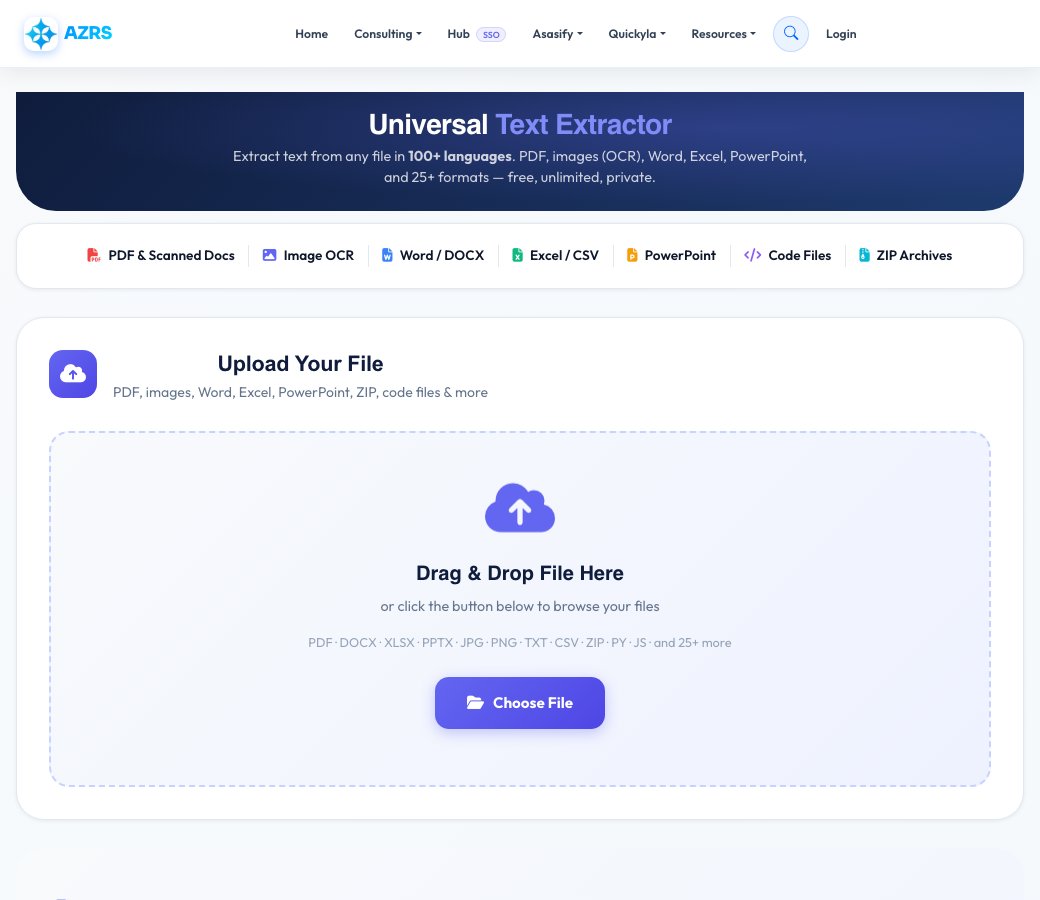
Universal Text Extractor
Extract text from any file in 100+ languages. PDF, images (OCR), Word, Excel, PowerPoint, and 25+ formats — free, unlimited, private.
Upload Your File
PDF, images, Word, Excel, PowerPoint, ZIP, code files & more
Drag & Drop File Here
or click the button below to browse your files
PDF · DOCX · XLSX · PPTX · JPG · PNG · TXT · CSV · ZIP · PY · JS · and 25+ more
File Ready
Extracting Text…
Analysing file format
0%
Text Extracted Successfully!
25+ Supported File Formats
Extract text from virtually any file type — documents, images, spreadsheets, code and more
Documents
Spreadsheets
Images (OCR)
Presentations
Code & Data
Archives & Other
How to Extract Text — 3 Simple Steps
From upload to download in under 30 seconds
Upload Your File
Drag & drop or click to browse. Supports PDF, images, Word, Excel, PowerPoint, ZIP, code files and 25+ more formats.
Auto-Processing
Our engine detects your file type, runs OCR if needed (pick your language), and extracts all text instantly.
Download or Copy
Search, edit, then copy to clipboard or download as TXT, CSV, or HTML — whatever works best for you.
Supported OCR Languages
Extract text from images and scanned documents in 100+ languages
Most Used
European
Asian & South Asian
Middle East & Africa
Who Uses This Tool
Trusted by professionals across every industry
Business & Legal
Extract text from contracts, invoices, legal documents, and reports. Digitise scanned paperwork instantly.
Students & Researchers
Pull text from PDFs, research papers, textbook scans, and academic documents for citations and analysis.
Translators
Extract source text from documents in any language — Arabic, Chinese, Japanese and more — before translating.
Data Analysts
Extract and clean structured data from Excel, CSV, and PDF reports for analysis and processing pipelines.
Content Creators
Pull text from images, screenshots, and design files to repurpose content across different platforms.
Developers
Extract code from screenshots, extract config from documents, or parse structured data from mixed files.
Why AZRS Text Extractor?
See how we compare to other tools
| Feature | AZRS | Others |
|---|---|---|
| 100% Free | Always | Limited |
| No Signup Required | Yes | Required |
| 100+ Language OCR | Yes | Some |
| Files Never Uploaded | 100% Private | Server upload |
| 25+ File Formats | Yes | Limited |
| Multiple Export Formats | TXT, CSV, HTML | TXT only |
| Search in Results | Built-in | No |
| Watermarks on Output | None | Added |
| Daily File Limits | Unlimited | Capped |
Multilingual OCR Technology
Our Tesseract-powered OCR engine supports text extraction in over 100 languages — including English, العربية (Arabic), 中文 (Chinese), हिन्दी (Hindi), Español, Français, Deutsch, 日本語, 한국어, Русский, Português, Italiano, and many more. Select your language for best accuracy, or use Auto-Detect for mixed documents.
Extract From Any Document
Extract text from PDF documents, Word files (DOCX, DOC), Excel spreadsheets (XLSX, XLS), PowerPoint presentations (PPTX, PPT), images (JPG, PNG, GIF, BMP, TIFF), scanned documents, screenshots, code files (Python, JavaScript, HTML, CSS), ZIP archives, and 25+ other file formats.
Privacy-First Processing
Documents are processed entirely in your browser: no uploads, no server storage, no data retention — a good fit for sensitive files. For photos and scans, pick Private mode to keep everything on your device, or Accurate AI mode when you want the best reading quality (only that image is sent, and it is not stored).
See Free Universal Text Extractor & OCR Tool in action
Free Universal Text Extractor & OCR Tool
This text extractor pulls readable text out of more than 25 file formats: scanned images and photos (OCR in 100+ languages), PDFs, Word documents, spreadsheets, PowerPoint slides, code files and archives. Drop a file in and it detects the type automatically, then runs the right extraction method — optical character recognition for images, direct text parsing for documents and code, and cell-by-cell reading for spreadsheets.
Once extraction finishes you get live stats (word count, line count, character count, processing time), an in-page search with next/previous match highlighting, a line-reflow button that joins broken OCR lines back into paragraphs, and one-click export to TXT, CSV or HTML — all without uploading anything to a third-party service.
Key features
100+ language OCR
Extract handwriting-adjacent and printed text from photos and scans in dozens of languages, with an engine and language selector before you run it.
Document & spreadsheet parsing
Reads PDF text layers, Word paragraphs, Excel/CSV/TSV/JSON cells and PowerPoint slide text directly, no OCR needed for these.
Search and reflow the result
Search inside the extracted text with match highlighting, and reflow broken OCR line breaks into clean paragraphs.
Export in three formats
Copy to clipboard or download the result as a .txt, .csv or .html file.
How to use it
- Drag a file onto the upload area or click to choose one — images, PDFs, Office files, code or archives all work.
- For images, pick the OCR language and engine if the defaults don't match your document.
- Click extract and watch the progress bar while the file is analysed and processed.
- Search, reflow, copy or download the extracted text as TXT, CSV or HTML.
Worked example
Example
Upload a photo of a printed receipt taken on your phone. The extractor detects it's an image, runs OCR, and returns the item lines, totals and date as selectable, searchable plain text you can paste into a spreadsheet or expense tracker.
Who uses this tool
Students & researchers
Pull quotes and notes out of scanned book pages or lecture slide photos without retyping them.
Office & admin staff
Convert scanned forms, invoices and ID photos into text that can be searched, copied or filed.
Developers
Extract text from code screenshots, config files or archived project docs quickly.
Tips for the best results
- For OCR accuracy, use a well-lit, straight-on photo rather than an angled or blurry one.
- If a scanned document mixes languages, choose the specific language pack rather than leaving it on auto for best results.
- Use the reflow button after OCR on multi-column pages — it rejoins lines that got split at the wrong point.
- Large PDFs with only scanned image pages (no text layer) still need OCR — the extractor detects this and switches modes automatically.
Common mistakes to avoid
- Assuming OCR is 100% accurate on messy handwriting — it's built for printed and typed text, not handwriting recognition.
- Uploading a password-protected PDF and expecting text back — remove the password first.
- Forgetting to pick the right OCR language for non-English documents, which lowers accuracy noticeably.
Why use AZRS QuickFix?
It is 100% free, needs no signup and has no watermark or usage limits. The tool runs in your browser, so what you type stays on your device, and it works on phones, tablets and desktops. New tools are added every week — bookmark this page or browse the full QuickFix toolbox.
Frequently asked questions
Is the text extractor free?
Yes, completely free with no signup and no limit on how many files you process.
Which file types are supported?
Documents, spreadsheets, images (via OCR), PowerPoint slides, code files and common archive formats — 25+ types in total.
Does it work with scanned PDFs?
Yes. If a PDF has no selectable text layer, the extractor automatically falls back to OCR on the page images.
Is my file uploaded to a server?
Extraction runs through the app's own processing, and files are not retained after your session — nothing is shared with third parties.
Can I search inside the extracted text?
Yes, use the search box in the results panel with next/previous match navigation.
How accurate is the OCR?
Accuracy is high for clear, printed text in a supported language; low-resolution or handwritten input will reduce accuracy.