📅 Tax Season 2026 58 days remaining  📁 Collect W-2s, 1099s & receipts first.
AI-Powered · Free · No Signup

AI Text Paraphraser

Rephrase, rewrite, and humanize any text in 10 professional writing styles. Instant results, unlimited use, 100% free.

10 Writing Styles Unlimited Use Instant Results No Account Needed 500K+ Writers Export to TXT

AI Paraphraser

Rewrite text in 10 styles
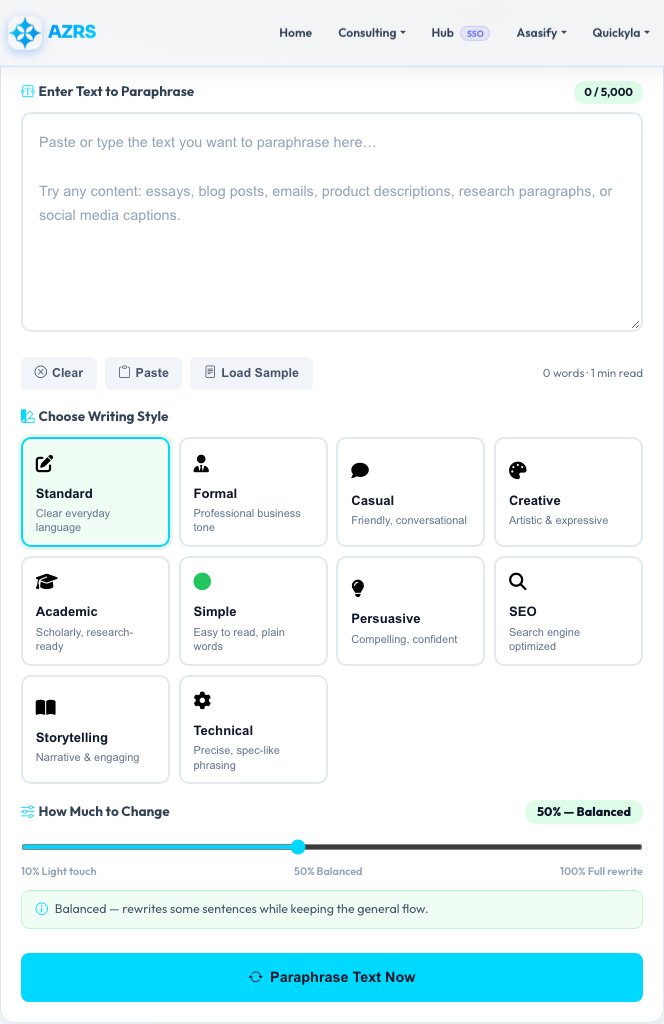
Enter Text to Paraphrase 0 / 5,000
Choose Writing Style
How Much to Change 50% — Balanced
10% Light touch 50% Balanced 100% Full rewrite
Makes moderate changes — rewrites some sentences while keeping the general flow.

Style Guide

Style Best For
📝 StandardGeneral content
👔 FormalEmails, reports
💬 CasualSocial media, chats
🎨 CreativeFiction, blogs
🎓 AcademicPapers, essays
🟢 SimpleKids, ESL, readability
💡 PersuasiveAds, pitches, CTAs
🔍 SEOBlog posts, landing pages
📖 StorytellingNarratives, case studies
⚙️ TechnicalDocs, specs, manuals

Pro Tips

Split long content into paragraphs and paraphrase each one separately for better results.
Use Academic style for essays and research papers to get formal scholarly phrasing.
The SEO style rewrites with active voice and natural keyword flow — great for blog posts.
Higher Originality Score means more words were changed. Aim for 40%+ for distinct rewrites.
Use Simple style to make complex technical text readable for general audiences.

Why Our Paraphraser Stands Out

The most feature-rich free AI paraphrasing tool online. More styles, more insights, more control than any other free tool.

10 Writing Styles

Standard, Formal, Casual, Creative, Academic, Simple, Persuasive, SEO, Storytelling, and Technical — covering every content need.

Deep Analytics

Compare word count, character count, sentence count, reading time, and originality score between your original and paraphrased text.

4 View Modes

Switch between Original view, Paraphrased view, Side-by-Side comparison, and Word Changes panel to inspect every difference.

Originality Score

See a visual originality percentage showing exactly how different the paraphrase is from the source — powered by Jaccard similarity analysis.

Word Change Tracker

See exactly which words were removed or substituted during paraphrasing, giving you full transparency into the rewriting process.

Export to TXT

Download your paraphrased text as a .txt file instantly. Copy to clipboard with one click for seamless integration into any editor.

History Tracking

Your last 5 paraphrases are saved to your private account history so you can always refer back to previous rewrites.

100% Free & Private

No signup. No credit card. Your text is never sold or shared. Unlimited paraphrasing for life, completely free.

How to Paraphrase Text Online

Our tool is designed for speed and quality. Follow these 4 simple steps to get professional paraphrasing results in seconds.

1

Paste or Type Your Text

Enter the content you want to rephrase in the text box. Use the Load Sample button to try a demo, or click Paste to pull from your clipboard.

2

Select a Writing Style

Choose from 10 styles depending on your goal — Academic for essays, SEO for blog posts, Casual for social media, Formal for business emails.

3

Click "Paraphrase Text Now"

Submit the form. Within seconds, your paraphrased result appears with a full analysis including originality score, word count comparison, and sentence stats.

4

Copy, Download, or Compare

Use the view tabs to compare original vs paraphrased, see word changes, or view them side by side. Copy or download your result with one click.

All 10 Paraphrasing Styles Explained

Each style rewrites your content using a different vocabulary, tone, and sentence structure. Here's when to use each one.

📝 Standard — For General Use

The default style rewrites your content in clear, balanced language. Best for everyday content, newsletters, product copy, and general website text. Maintains natural readability with a moderate synonym replacement rate.

👔 Formal — For Professional Writing

Expands contractions, replaces informal vocabulary, and adopts a professional tone. Ideal for business emails, official reports, cover letters, executive summaries, and government documents where formal language is required.

💬 Casual — For Social Media & Blogs

Introduces contractions and conversational phrasing to make content feel personal and approachable. Perfect for social media posts, personal blogs, community forums, and brand content targeting younger audiences.

🎨 Creative — For Expressive Writing

Uses the highest synonym replacement rate (50%) and introduces vivid descriptive language. Great for fiction, poetry descriptions, creative blog posts, brand storytelling, and marketing copy that needs personality.

🎓 Academic — For Scholarly Work

Replaces common verbs with formal academic equivalents (show→demonstrate, use→utilize, find→ascertain) and introduces scholarly connectors. Ideal for research papers, academic essays, journal submissions, and thesis writing.

🟢 Simple — For Maximum Readability

Replaces complex words with simpler equivalents (utilize→use, facilitate→help, demonstrate→show). Best for content targeting general audiences, children, ESL learners, accessibility needs, and plain language initiatives.

💡 Persuasive — For Marketing & Sales

Converts tentative language (might→will, could→can, possibly→certainly) into confident assertions. Perfect for advertising copy, sales pages, pitch decks, fundraising appeals, and any content meant to motivate action.

🔍 SEO — For Search Optimization

Rewrites with active-voice preference and natural language flow optimized for search engine readability. Use this for blog posts, landing pages, pillar content, and website copy where Google rankings matter.

📖 Storytelling — For Narrative Content

Adds narrative connectors (Meanwhile, Suddenly, Before long) and frames content as a story arc. Perfect for case studies, brand origin stories, testimonials, and any content that should feel like a journey rather than a list.

⚙️ Technical — For Documentation

Uses precise technical connectors (Specifically, In technical terms, From a functional perspective) and maintains technical vocabulary. Ideal for software documentation, API guides, product specifications, and engineering reports.

AZRS Paraphraser vs The Competition

See how our free tool compares to the most popular paraphrasing tools available.

Feature AZRS Paraphraser QuillBot (Free) Grammarly WordAi
Number of Writing Styles✓ 10 Styles2 styles1 style✗ 1 style
Character Limit (Free)✓ 5,000 chars125 wordsLimited✗ Paid only
Originality Score✓ Yes✓ Yes✗ No✗ No
Side-by-Side Comparison✓ Yes✗ No✗ No✗ No
Word Change Tracker✓ Yes✗ No✗ No✗ No
Reading Time Comparison✓ Yes✗ No✗ No✗ No
Sentence Count Comparison✓ Yes✗ No✗ No✗ No
Export to TXT✓ Yes✗ No✗ No✓ Yes
No Signup Required✓ Yes✗ No✗ No✗ No
100% Free✓ Always FreeFreemiumFreemium✗ Paid
History Tracking✓ Yes✗ No✓ Yes✗ No

Who Uses Our Paraphraser?

Over 500,000 writers, students, and professionals use our tool every month. Here's why.

Students & Academics

Rephrase research notes, avoid accidental plagiarism, and rewrite textbook explanations in your own words for essays, assignments, and study guides.

SEO & Content Writers

Refresh old blog posts, create unique variations of content for different pages, and rewrite competitor content in your own voice using our SEO style.

Business Professionals

Rewrite emails, proposals, and reports in a formal or persuasive tone. Repurpose internal documents for external audiences without starting from scratch.

Non-Native English Speakers

Use our Simple style to make your translated or drafted text sound more natural in English. Perfect for ESL writers and international business communication.

Marketers & Copywriters

Create multiple ad variants, A/B test different tones, and repurpose long-form content into social media posts using different style settings.

Bloggers & Journalists

Repurpose press releases, rewrite news summaries in your own voice, and adapt content from one publication style to another without manual effort.

Frequently Asked Questions

Everything you need to know about our free AI paraphrasing tool.

Is this paraphraser 100% free?
Yes, completely free with no limits. No signup, no credit card, no premium plans. Paraphrase as much content as you need, as often as you like, forever.
What is the maximum text length?
You can paraphrase up to 5,000 characters at a time — roughly 750-900 words. For longer content, split it into sections, paraphrase each one separately, and combine the results.
What is the originality score?
The originality score is calculated using Jaccard similarity — it measures what percentage of words in the paraphrased text are different from the original. A score of 50% means half the unique words were changed. Aim for 40%+ for a substantially different paraphrase.
Which style should I use for academic writing?
Use the Academic style. It replaces casual verbs with formal equivalents (show→demonstrate, use→utilize), introduces scholarly connectors (Empirical evidence suggests, Research demonstrates), and adopts a measured, analytical tone appropriate for research papers, essays, and journal submissions.
Can I use this for SEO content?
Yes. Select the SEO style to get rewritten content with natural active-voice construction, balanced keyword density, and clean readability — all factors that affect Google rankings. Great for refreshing existing blog posts and repurposing content across pages.
Is my text stored or shared?
If you are not logged in, your text is never stored. If you are logged in, your last 5 paraphrases are saved to your private account history — only visible to you. We never sell, share, or use your content for any purpose.
Can I paraphrase in languages other than English?
Our synonym replacement dictionary is currently optimized for English. The tool will process text in any language but synonym substitution will only apply to recognized English words. Non-English text will still receive sentence restructuring based on the selected style.
How does the Simple style make text easier to read?
The Simple style systematically replaces complex or academic vocabulary with common everyday equivalents: utilize→use, facilitate→help, demonstrate→show, subsequently→then. This reduces average word length and lowers the Flesch reading ease difficulty, making content accessible to broader audiences.

What is Paraphrasing and Why Does It Matter?

Paraphrasing is the process of rewriting text in new words while preserving the original meaning. Unlike summarizing (which condenses content), paraphrasing retains the full scope and detail of the source material — just expressed differently.

In academic writing, paraphrasing is a critical skill. Citing information in your own words — rather than copying verbatim — demonstrates comprehension and avoids plagiarism. Most universities require students to paraphrase rather than quote directly except in specific circumstances.

In content marketing, paraphrasing helps repurpose existing material across channels. A single long-form article can be paraphrased into social media posts, email newsletters, and landing page copy — each with a different tone and style suited to the platform and audience.

Paraphrasing vs Summarizing vs Quoting

MethodChanges Length?Changes Words?Keeps All Info?
ParaphrasingRoughly same✓ Yes✓ Yes
Summarizing✓ Shorter✓ Yes✗ No (condensed)
Direct QuoteExactly same✗ No✓ Yes
When to paraphrase: Use paraphrasing when you want to integrate source information into your own writing while maintaining your unique voice. Use direct quotes sparingly — only when the exact wording is significant (definitions, famous statements, legal text).
All Tools
Homework Planner
GPA Calc
Flashcards
Citations
Study Timer
Grade Calc
Unit Conv.
File Compress
File Convert
PDF Merger
Image→PDF
Text Extract
Video DL
PDF Splitter
File Encrypt
BG Remover
FG Remover
Color Changer
Img Resizer
QR Code
Percentage
Loan EMI
Mortgage
Tax Calc
Salary
Currency
BMI
Tip Calc
Compound Int.
Translator
Summarizer
Transcription
AI Chat
Project Maker
Paraphraser
Word Counter
Case Converter
Paraphraser
Summarizer
Text Extractor
Find & Replace
Diff Checker
Text to Speech
Lorem Ipsum
JSON Format
Base64
Regex Tester
Speed Test
My IP
Notes App
Stock Advisor
Risk Simulator
CSV↔JSON
XML↔JSON
Base64
URL Encode
Binary↔Text
MoleMath
ChemScope
Periodic Table
SEO Analyzer
Speed Test
Keywords
Internal Links
Cannibalization
Tech Stack
Islam Home
Prayer Times
Quran Reader
Halal/Haram
Christianity
All Religions
Prayer Times
Athan
Qibla
Tasbih
Halal Scanner
Zakat Calc
Masjid Finder
Ramadan
Quran Reader
Hadith
Flappy Bird
Snake
Chess
2048
Tetris
All Games →
All News
Tech News
AI News
World News
Islamic News
Finance News
Sports
Science
Health
Web Dev
Tax Services
Business
Book Appt
Expenses
All Services