Redirect Chain Visualizer
Trace Complete Redirect Paths with Visual Flowcharts
See your redirects as A → B → C → D flowcharts. Detect redirect loops, broken chains, and excessive hops hurting your SEO. Get instant visual analysis.
Redirect Chain Analysis
Why Check Redirect Chains?
Redirect chains slow down your site, waste crawl budget, and dilute link equity. Find and fix them before they hurt your SEO.
Visual Flowcharts
See your complete redirect path as an easy-to-understand visual chain showing A → B → C → D with status codes.
Detect Redirect Loops
Instantly identify infinite redirect loops where pages redirect to each other, causing errors and poor user experience.
Find Long Chains
Discover redirect chains with 3+ hops that slow down page loading and waste Google's crawl budget.
Status Code Analysis
See every status code in the chain - 301, 302, 307, 308 - and understand which redirects are permanent vs temporary.
SEO Impact Report
Get recommendations on how redirect chains affect your SEO, page speed, and link equity distribution.
Fix Suggestions
Receive actionable advice on how to fix redirect chains by updating links to point directly to final destinations.
Understanding Redirect Chains
A redirect chain occurs when a URL redirects to another URL, which redirects to another URL, creating a chain of redirects before reaching the final destination.
Types of Redirects
- 301 (Permanent): Tells search engines the page has permanently moved. Passes most link equity to the new URL.
- 302 (Temporary): Indicates temporary redirect. May not pass full link equity and confuses search engines about which version to index.
- 307 (Temporary): Similar to 302 but maintains the original HTTP method (GET/POST).
- 308 (Permanent): Similar to 301 but maintains the original HTTP method.
Why Redirect Chains Are Bad
- Slower Page Speed: Each redirect adds latency. A chain of 5 redirects can add 1-2 seconds to page load time.
- Wasted Crawl Budget: Google has to follow each redirect, using up crawl budget that could be spent on other pages.
- Diluted Link Equity: Each redirect in the chain loses a small amount of link equity (PageRank).
- Poor User Experience: Users wait longer for pages to load, increasing bounce rates.
- Indexation Issues: Google may not follow long redirect chains (5+ hops) and fail to index your content.
How to Fix Redirect Chains
1. Update Internal Links: Change all internal links to point directly to the final destination URL instead of redirected URLs.
2. Update Redirects: Modify your redirect rules to point directly to the final URL rather than to another redirect.
3. Remove Unnecessary Redirects: If possible, eliminate redirects entirely by updating links at the source.
4. Use 301 for Permanent Moves: Always use 301 redirects for permanent changes, not 302 (temporary).
5. Consolidate Domain Redirects: Ensure www/non-www and HTTP/HTTPS redirects happen in one hop, not multiple.
Best Practices
- Keep redirect chains to a maximum of 1-2 hops (ideally direct redirects only)
- Regularly audit your redirects using this tool
- Document all redirects in a redirect map spreadsheet
- Set up monitoring to catch new redirect chains early
- After site migrations, check all old URLs for redirect chains
How to Use This Tool Effectively
Actionable SEO advice to get the most out of every analysis
Start With Your Competitors
Run your top 3 competitors through this tool first. Understanding their structure, keywords, and technical issues reveals exactly where you can outrank them.
Run Monthly Audits
SEO is not a one-time task. Schedule monthly checks to catch new issues before Google penalizes them. Consistent analysis beats one big yearly audit every time.
Fix High-Impact Issues First
Not all errors are equal. Prioritize: broken crawl paths → missing meta titles → slow load times → thin content. This order maximizes ranking gains per hour spent.
Internal Links Are Free PageRank
Every internal link passes authority between your pages. Use the Internal Link Finder to ensure your most important pages receive the most internal links.
Page Speed Directly Affects Rankings
Google's Core Web Vitals are a confirmed ranking factor. Pages loading under 2.5 seconds see significantly higher rankings and 40% lower bounce rates than slow pages.
Keep Your Sitemap Clean
Your sitemap tells Google what to index. Remove redirect chains, 404s, and noindex pages from it. A clean sitemap = faster, more complete indexation of good content.
More Free SEO Tools
Everything you need to dominate search rankings — all free, no signup required
🔍 SEO & Website Analysis
🧮 Free Calculators
⚙️ Developer & Utility Tools
See Redirect Chain Visualizer in action
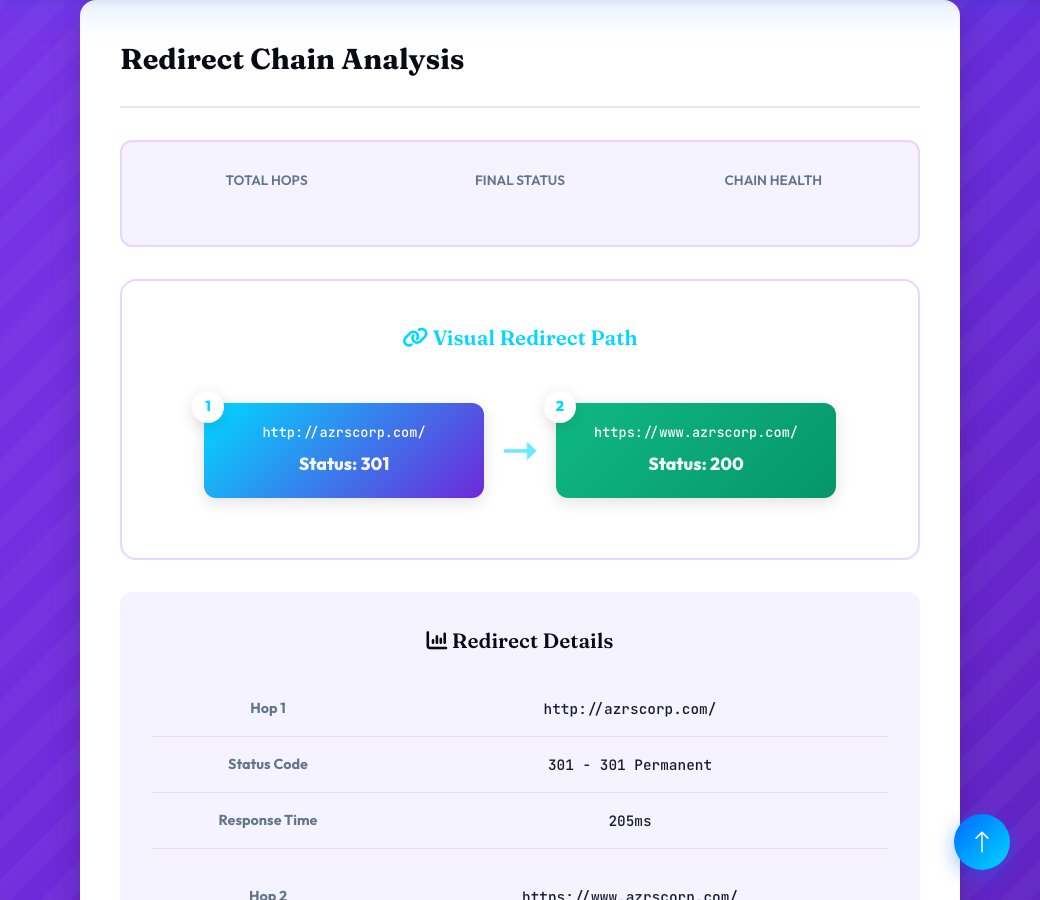
Redirect Chain Visualizer
Enter a URL and this tool follows every redirect it produces, hop by hop, up to 10 redirects deep, showing you the complete path from the original URL to its final destination — and flags a redirect loop immediately if the chain ever points back to a URL already visited.
Each hop in a redirect chain adds latency and can dilute link equity, so seeing the full chain laid out — rather than just knowing 'it eventually redirects somewhere' — makes it obvious exactly where to shorten the path to a single, direct redirect.
Key features
Full chain tracing
Follows every hop up to 10 redirects deep instead of just checking the first redirect.
Loop detection
Automatically flags a redirect loop the moment a URL repeats in the chain.
Visual step-by-step path
See the complete A → B → C journey clearly, not just a final destination URL.
Hop count at a glance
Instantly see how many redirects a URL goes through before landing.
How to use it
- Enter the URL you want to trace.
- Run the check and let it follow the redirect chain live.
- Review each hop in the path from start to final destination.
- If more than one redirect is found, update the original link to point directly at the final URL.
Worked example
Example
Tracing an old product URL reveals a 3-hop chain — old-product → category-redirect → new-product — flagged for consolidation into a single direct redirect straight to the final URL.
Who uses this tool
SEO specialists auditing redirects after a migration
Confirm old URLs redirect cleanly in one hop instead of accumulating chains over multiple redesigns.
Developers debugging slow page loads
Identify pages losing time to multiple redirect hops before the content ever loads.
Site owners cleaning up old campaign links
Check that old marketing or affiliate links still resolve correctly and efficiently.
Tips for the best results
- Always point internal links and canonical redirects directly at the final destination URL, not at an intermediate redirect.
- Fix chains of more than 2 hops — each additional hop adds real latency and crawl inefficiency.
- Check redirect chains after every site migration or URL restructuring, since they tend to accumulate over multiple redesigns.
- Treat a detected redirect loop as urgent — a looping URL is completely inaccessible to both users and search engines.
Common mistakes to avoid
- Letting redirect chains build up over successive site redesigns instead of updating old redirects to point directly at the current URL.
- Assuming a URL that 'eventually loads' has no problem, when in fact each hop adds delay and dilutes SEO value.
- Not checking for redirect loops, which can silently make a URL completely unreachable.
Why use AZRS QuickFix?
It is 100% free, needs no signup and has no watermark or usage limits. The tool runs in your browser, so what you type stays on your device, and it works on phones, tablets and desktops. New tools are added every week — bookmark this page or browse the full QuickFix toolbox.
Frequently asked questions
What is a redirect chain?
A sequence where URL A redirects to B, which redirects to C, and so on — each additional hop before the final destination is one link in the chain.
How many redirects are too many?
More than 2 redirects in a single chain is generally considered problematic; browsers and crawlers will follow up to around 10, but each hop reduces crawl efficiency and adds latency.
What is a redirect loop?
A redirect loop is when a chain points back to a URL that's already appeared earlier in the same chain, creating an infinite cycle that makes the page completely inaccessible.
How deep does this tool trace?
Up to 10 redirect hops per URL checked.
What should I do if I find a chain?
Update the original link, canonical tag, or server-side redirect rule to point directly at the final destination URL, removing the intermediate hops.
Is this free?
Yes, free with no signup required.